

You hit something good. Now what?
Maybe it’s going straight into your collection. Maybe you’d rather sell it and put the money toward your next chase. Or maybe you want a closer look before deciding whether to grade it.
We’re bringing Heystack to our Whatnot breaks to make those next steps easier. Once we’ve processed a break, you can review images of your uploaded hits and tell us what you’d like to do with them.
Set up your account and connect Whatnot once. After that, Heystack emails you when your hits are ready to review. Just want your cards shipped? You don’t need to select anything.
This guide is for WSR Whatnot breaks held on or after September 16, 2026.
1. Create your Heystack account
Sign up for Heystack. Use an email address you check—that’s where your hit notifications will go. Complete the registration and verification steps, then sign in.
Already have a Heystack account? Sign in to that account. You don’t need a second one for WSR.
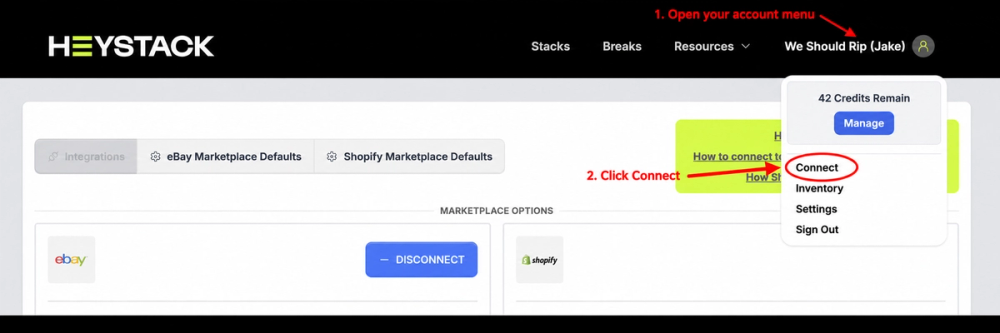
2. Open your account menu and choose Connect
On desktop, click your name or profile icon in the top-right corner, then select Connect from the dropdown. Your account will show your own name; mine is shown in the example.
3. Find an eligible Whatnot Order ID
You’ll need your Whatnot username and an Order ID from one of your WSR breaks held on or after September 16, 2026.
To find the Order ID in the Whatnot app or website:
- Open Activity.
- Select Purchases.
- Open an order from an eligible WSR break.
- Copy the Order ID from the order details. Whatnot identifies it as a nine-digit number. Use the Order ID, not the shipping tracking number.
Whatnot’s order-details instructions
4. Connect Whatnot to Heystack
Back on Heystack’s Connect page, scroll to the Whatnot section.
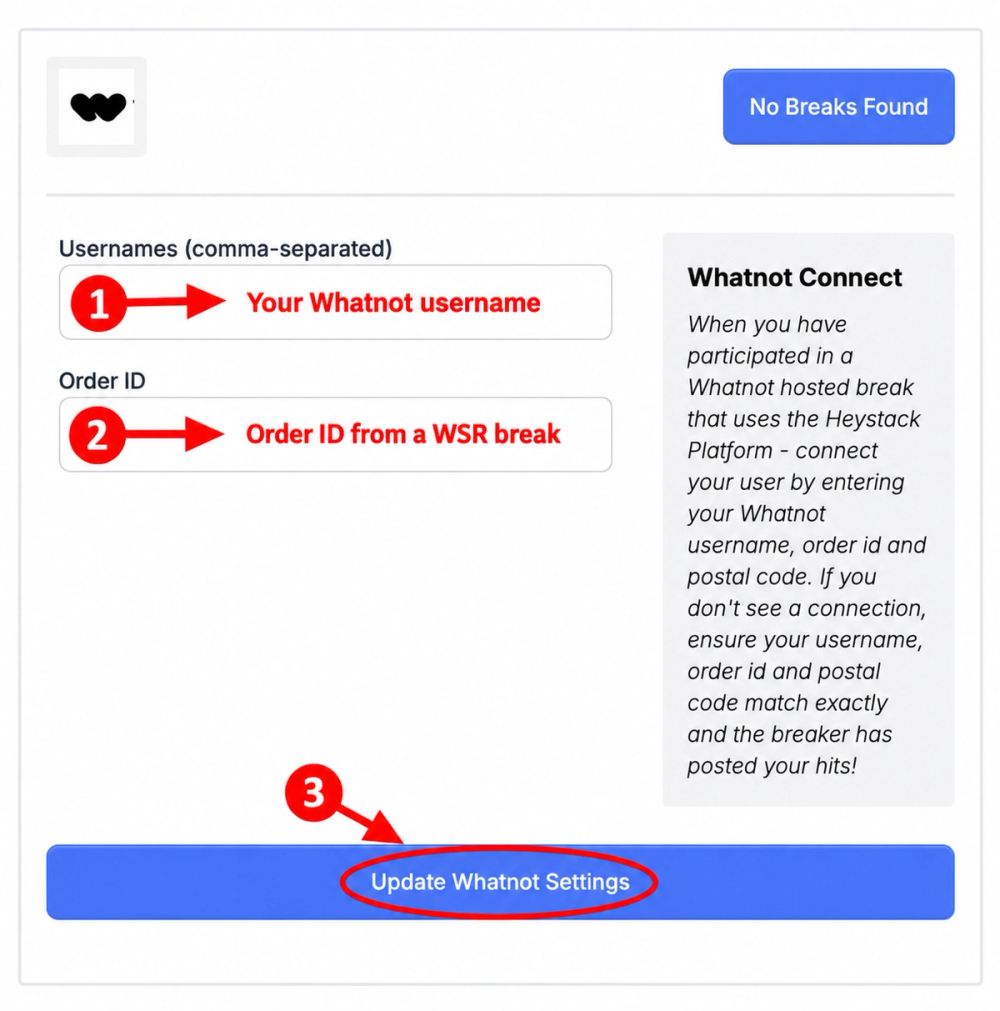
- Enter the Whatnot username you used to buy your spot in the Usernames field.
- Paste the eligible Order ID into the Order ID field.
- Click Update Whatnot Settings.
You only do this once. The order verifies the connection to your Whatnot username. You do not need to enter a new Order ID after every break.
If you see “No Breaks Found,” double-check the username and Order ID. We also need to have processed that break in Heystack before it can connect. If we haven’t finished uploading it yet, try again once it’s ready.
The help text in the screenshot also mentions a postal code. If Heystack asks for one during setup, use the postal code associated with your Whatnot order.
5. Watch for your hit email
Once you’re connected, future WSR breaks uploaded and marked ready in Heystack will trigger an email letting you know your hits are ready to review. Follow the email to view them and make your choices before the action deadline.
No email? Check spam or junk, confirm you’re checking the email used for Heystack, and make sure we’ve finished processing the break. Still stuck? Use our contact form with your Whatnot username and the show date so we can help.
What can you do with your cards?
Ship them to me
This is the default. If you want your cards sent home, no action is necessary.
Our choice window closes 24 hours after the show ends. At that point, hits without another selected arrangement are automatically marked for shipping. That is the decision deadline, not the moment a package leaves our hands.
For a Wednesday show, shipments go out Friday automatically. If you’d like consignment or a grading evaluation, make your request before the deadline shown for your break.
And yes—we still ship all cards. Heystack gives you options for your hits; it doesn’t change our all-cards-ship promise.
Consign a card with us
Want us to handle selling a card? Choose consignment for that card before the deadline.
For our introductory offer, September 16–October 16, 2026, we’re offering a flat $5 consignment fee per card valued from $25 to $500. The $5 is deducted from net proceeds after the sale is complete.
For cards valued above $500, we’ll discuss the arrangement with you individually.
Change your mind before your card sells? We’re happy to return a recalled card to you for the cost of shipping.
Ask about grading
We can also provide grading evaluations and submission services. These are handled case by case. Request an evaluation before the deadline, and we’ll discuss your card and the next steps with you.
Set it up once. Then enjoy the cards.
Create your Heystack account, connect your Whatnot username, and you’re set for future uploaded WSR breaks.
Keep the card, consign it, or ask us about grading. If you just want it shipped, you’re already covered.
—Jake
Sources
Get new checklists, WSR stories, and break updates by email.
Keep me in the loop →